How to get cited by Copilot
Copilot answers from the Bing index, which makes an old crawler the gatekeeper and two meta tags the controls. Almost nobody is blocking it.
How to get cited by Copilot
- How to get cited by Copilot
- Does Copilot have its own crawler?
- How do I see which queries cited my site in Copilot?
- How do I get pages into the Bing index faster?
- How should I structure a page for Copilot?
- Why is Bing the neglected route to AI citations?
- What should I check for Copilot this week?
- How to get cited by Copilot: the short version
Microsoft Copilot is the assistant with the simplest route in and the smallest amount of new work to do. It answers from the Bing index, so the crawler that decides your eligibility is bingbot, which has been visiting your site for years.
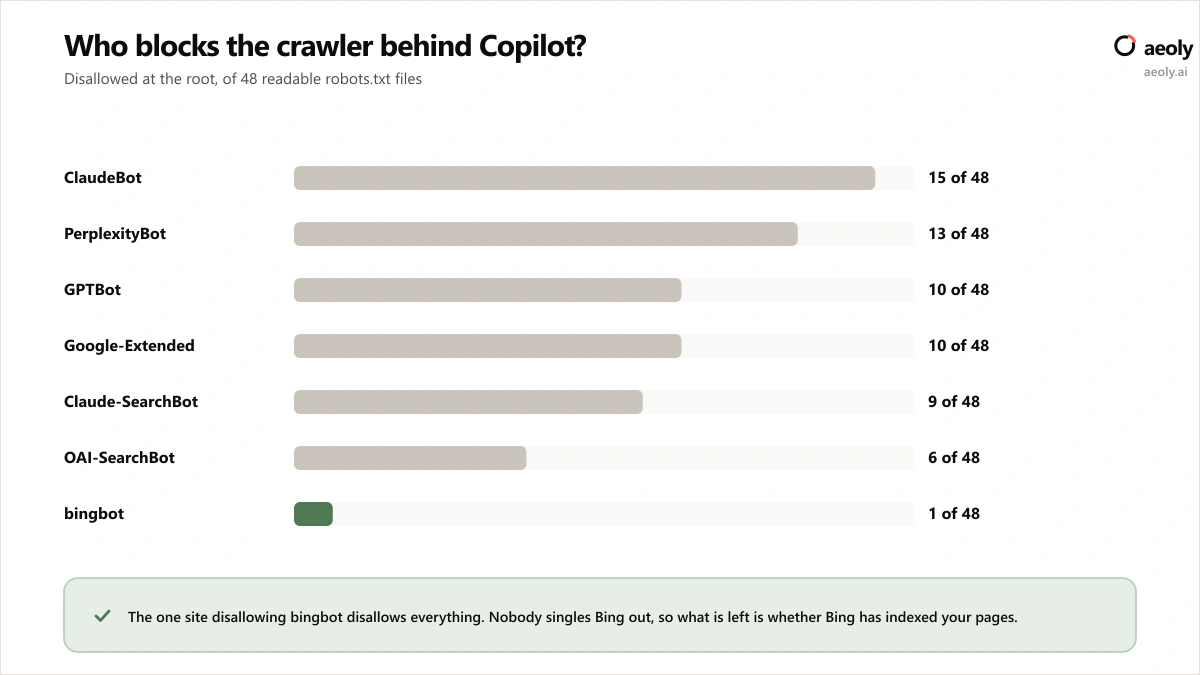
Of 48 readable robots.txt files in our survey, exactly one disallowed bingbot, and that site disallows all seven crawlers we tested. Not a single site singled Bing out.
How to get cited by Copilot
To get cited by Copilot, make sure bingbot can reach you and that Bing has indexed the pages you care about, because Copilot answers from the Bing index. Keep NOARCHIVE off anything you want quoted, and read the free AI Performance report in Bing Webmaster Tools to see which queries already cite you.
There is no new robots.txt group to add, because bingbot is already allowed on essentially every site. The controls Microsoft gives you for AI answers live on the page instead, as meta tags.
HTML head
<!-- Only URL, title and snippet may be shown in an AI answer -->
<meta name="robots" content="nocache">

<!-- Excluded from Bing Chat answers entirely, and not linked to -->
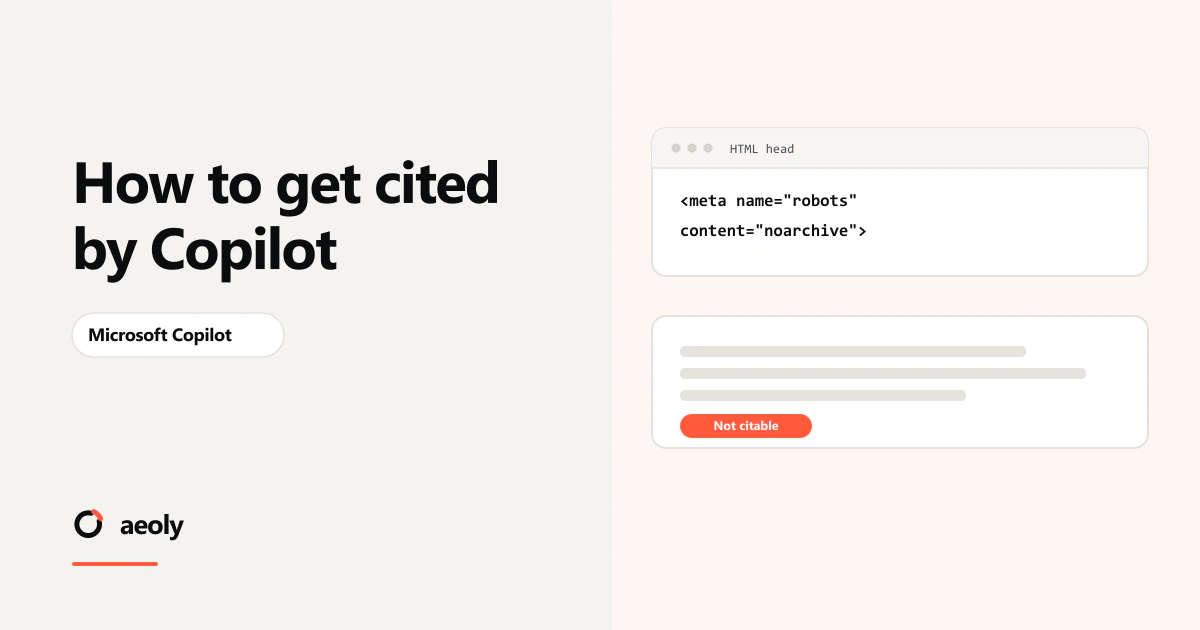
<meta name="robots" content="noarchive">
Neither affects ordinary Bing search results. Where both are present, Microsoft treats the page as NOCACHE.
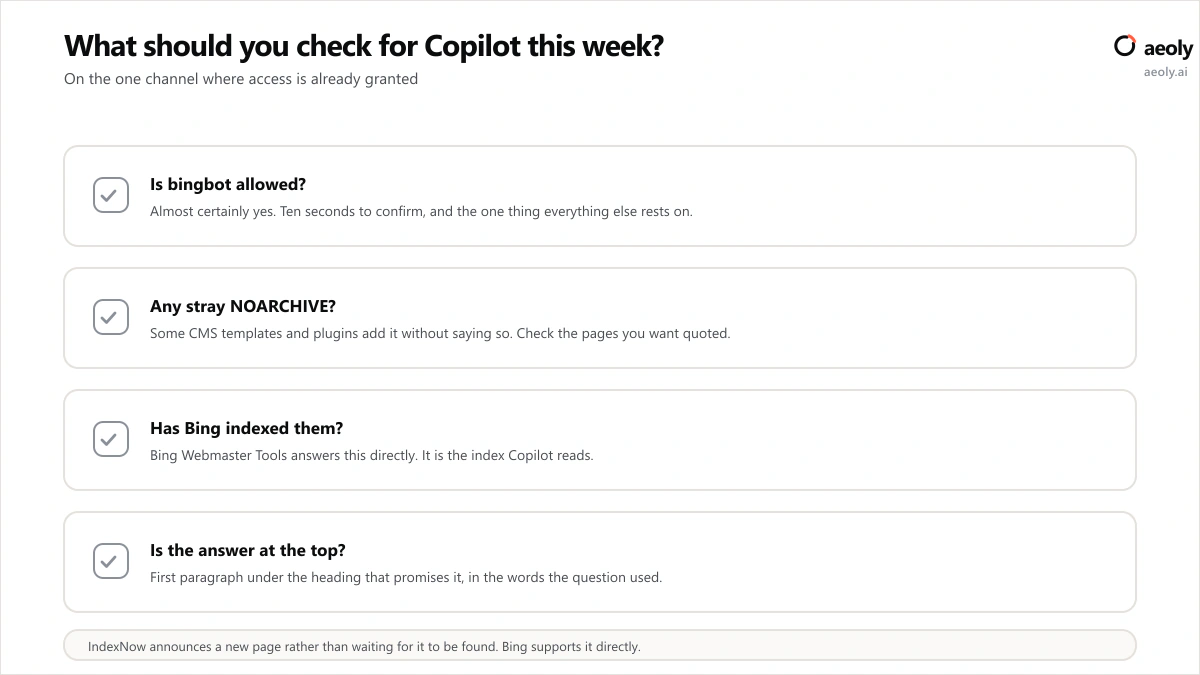
So the work here is not permission, it is attention. Four things, in this order, and the first three are verification rather than optimisation:
- Confirm bingbot is allowed. It almost certainly is, it takes ten seconds, and everything else rests on it.
- Check your key pages for a NOARCHIVE tag you did not add. Some CMS templates and SEO plugins insert one without announcing it.
- Confirm Bing has actually indexed the pages you care about, using Bing Webmaster Tools. This is the index Copilot reads, and it is not Google's.
- Open the AI Performance report, which names the queries that retrieved your pages. No other assistant in this series gives site owners anything comparable, and it is free.
That last one is why this is the cheapest assistant to work on. Everywhere else you are typing questions by hand and recording what you happened to see that day. Here the index owner tells you which phrase pulled which page.
Does Copilot have its own crawler?
Copilot draws on the Bing index, so being crawled and indexed by bingbot is the precondition for being cited. Microsoft's controls for AI answers are meta tags rather than robots.txt tokens: NOCACHE limits an answer to your URL, title and snippet, while NOARCHIVE excludes the page from Bing Chat answers entirely.
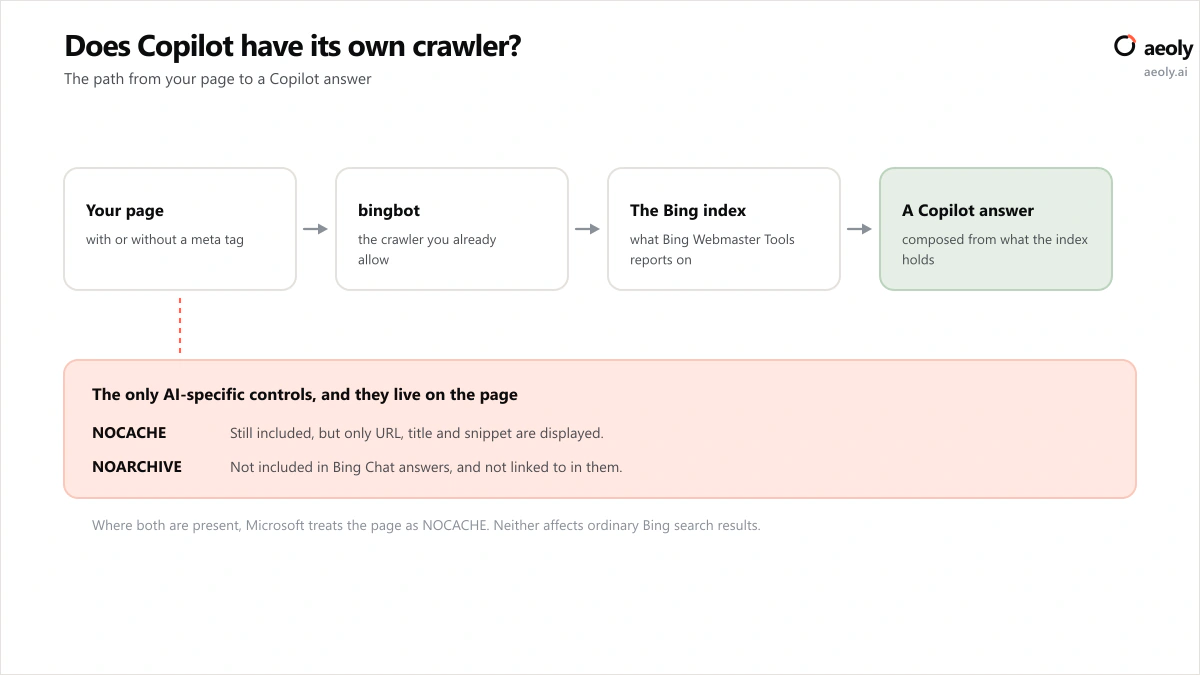
Since almost nobody disallows bingbot, the question worth answering is whether you are one of the few who does. You can check that in a few seconds, and the same check covers the ten other AI crawler tokens while it is reading the file.
The two tags do different amounts of damage, and the difference is worth knowing before you inherit one from a template.
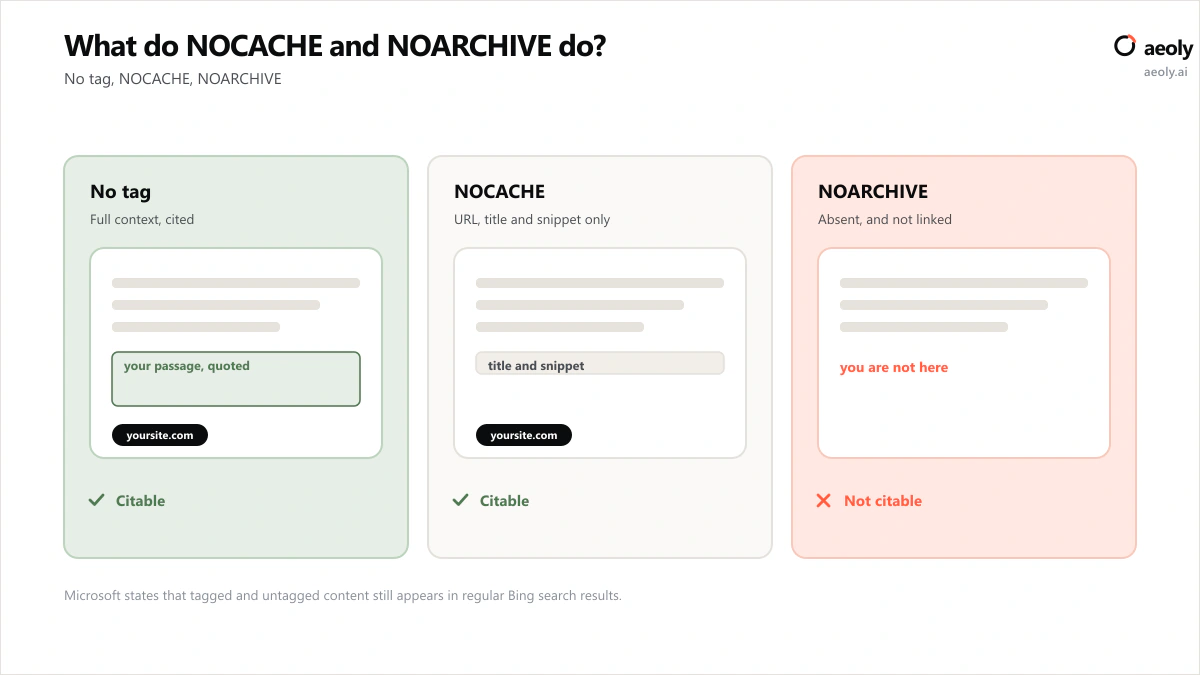
Microsoft notes that where a page carries both, it is treated as NOCACHE. It also confirms that tagged and untagged content still appears in ordinary Bing search results, so neither tag is a ranking decision.
How do I see which queries cited my site in Copilot?
This is the part that makes Copilot different from every other assistant in this series, and it is free. The AI Performance report in Bing Webmaster Tools shows how your content is used in AI-generated answers across Microsoft Copilot and partner experiences, including the grounding queries associated with your content.
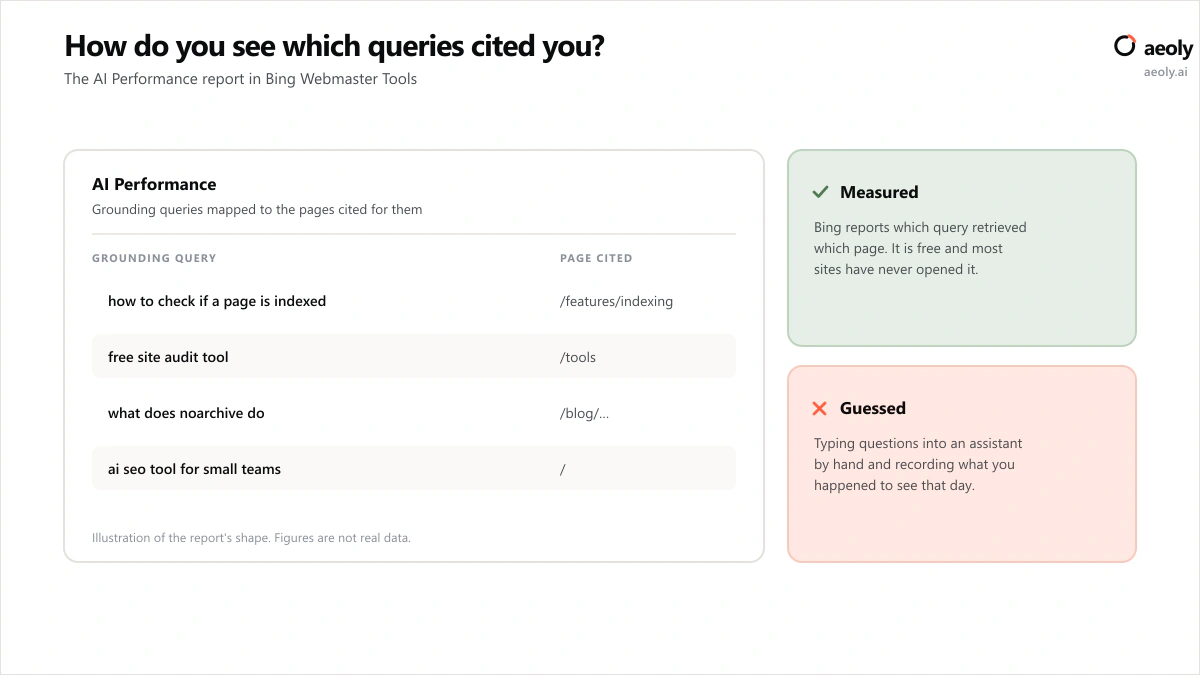
Grounding queries are the phrases the system used to retrieve content it then cited. Microsoft has since added classification of those queries into intents and topic clusters. No other assistant publishes anything comparable for site owners.
Every other vendor in this series leaves you typing questions by hand and recording what you happened to see. Microsoft just tells you.
If you have been estimating your AI visibility from spot checks, this is a real measurement sitting behind a free login that most sites have never opened.
How do I get pages into the Bing index faster?
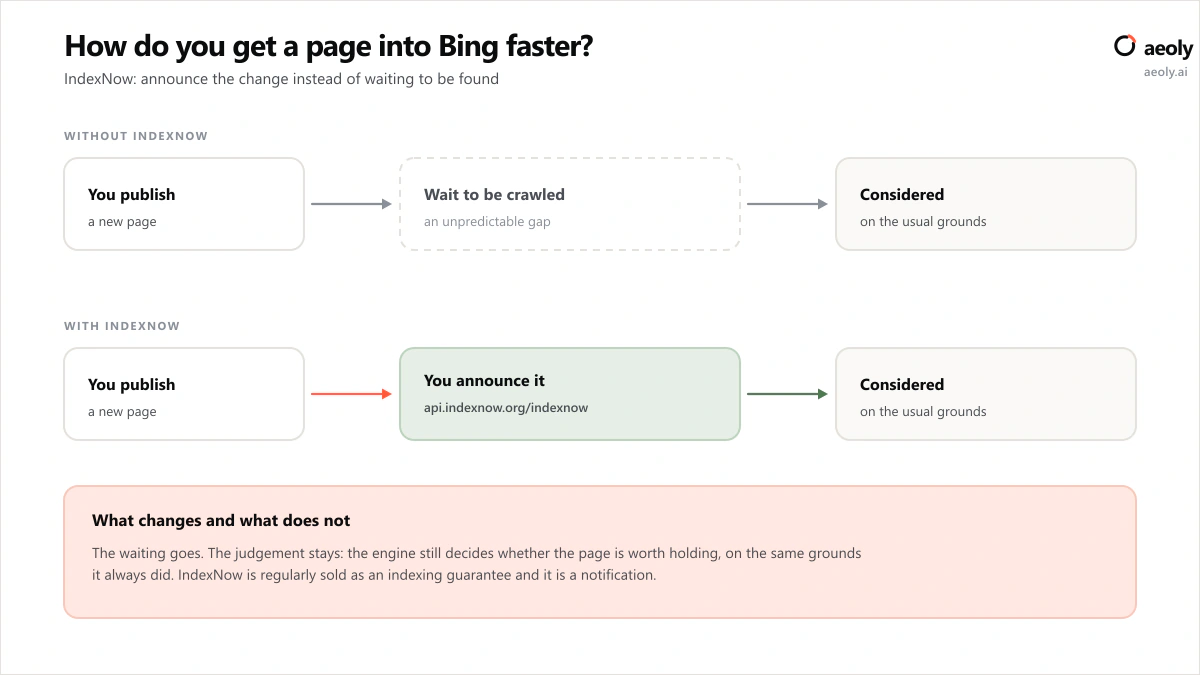
Use IndexNow. It is a protocol Microsoft supports directly that lets you notify search engines the moment a URL is published, updated or deleted, instead of waiting to be crawled. Bing hosts documentation and a key-generation page for it, and most CMS platforms have a plugin that does the work.
The mechanism is simple enough to implement by hand if you would rather not add a plugin: generate a key, host it as a text file at your domain root, then post the changed URLs to the endpoint whenever you publish.
IndexNow, by hand
# 1. Host your key at the domain root
https://yoursite.com/<your-key>.txt

# 2. Announce a change
https://api.indexnow.org/indexnow
  ?url=https://yoursite.com/blog/your-new-page
  &key=<your-key>
Announcing a page is not the same as being indexed. It removes the waiting, not the judgement.
That distinction matters because IndexNow is regularly sold as an indexing guarantee. It is a notification. The engine still decides whether the page is worth holding, on the same grounds it always did.
How should I structure a page for Copilot?
Write it for Bing, because the index is the same. Then make sure the passage a Copilot answer would quote is a passage that stands on its own, and that you have not accidentally told Bing it may not be shown.
The second half of that is the one worth a manual check, because it is the failure that produces no error anywhere. A NOARCHIVE tag inherited from a template, or a snippet directive somebody added to stop a competitor scraping prices, both remove you from AI answers while leaving your rankings untouched and your reports looking normal.
- Inline attribution helps here in a way it does not everywhere. An answer assembled from passages carries whatever attribution the passage contains, so Microsoft reported X survives the trip and studies show X does not.
- Keep one claim per paragraph. A paragraph making three claims is a paragraph that cannot be quoted for any one of them.
- Check the page in Bing, not Google. They are different indexes with different coverage, and the one feeding Copilot is the one most teams have never opened.
- Submit the sitemap in Bing Webmaster Tools and read the coverage report there at least as seriously as you read Search Console.
Then open the AI Performance report and see which queries actually retrieved you. That is the closing of the loop, and it is the reason this assistant is the cheapest one in the series to work on: everywhere else you are inferring, and here you are reading.
Why is Bing the neglected route to AI citations?
Plenty of teams stopped thinking about Bing a decade ago. That was defensible when Bing was a smaller search engine and nothing else. It is a stranger position now that the same index feeds an assistant built into Windows and Office.
Figures come from Aeoly's robots.txt survey of 52 well-known sites, run on 12 September 2026. Each site's robots.txt was read once with our own user agent and all seven crawler tokens were evaluated against that one file. 48 sites returned a readable robots.txt and the other 4 are excluded rather than counted as permissive. The survey reads robots.txt only and never crawls the sites themselves.
The practical consequence: submit your sitemap in Bing Webmaster Tools, check your pages are indexed there, and treat the coverage report as seriously as you treat Search Console. It is the cheapest AI visibility work available because the access is already granted.
What should I check for Copilot this week?
Aeoly checks indexing across search engines on a weekly schedule and submits new pages through IndexNow, which Bing supports directly, so a published page is announced rather than waited for. That is in indexing if you want it automated. Bing Webmaster Tools covers the checking side for free if you would rather assemble it yourself, and for this one assistant the free version is genuinely most of the way there.
How to get cited by Copilot: the short version
There is no special Copilot crawler to allow and no new token to add. Confirm bingbot can reach you, keep NOARCHIVE off the pages you want quoted, get your sitemap into Bing Webmaster Tools, read the AI Performance report, and write answers that sit at the top of the sections that promise them. Getting cited by Copilot is mostly a matter of paying attention to an index you already have access to.
The assistants where access is genuinely contested are covered in how to get cited by Claude and how to get cited by Perplexity, where roughly a third of the sites we surveyed disallow the crawler.
More questions
Does Copilot have its own crawler?
No separate crawler is published for it. Copilot draws on the Bing index, which bingbot builds, so bingbot's access to your site is what governs eligibility. Microsoft's AI-specific controls are the NOCACHE and NOARCHIVE meta tags rather than a distinct robots.txt user agent.
What is the difference between NOCACHE and NOARCHIVE?
A page tagged NOCACHE may still be included in Bing Chat answers, but only its URL, title and snippet are displayed, and only those may be used in training. A page tagged NOARCHIVE is not included in Bing Chat answers and is not linked to in them. Where both are present, Microsoft treats the page as NOCACHE.
Do these tags affect my Bing rankings?
Microsoft states that both tagged and untagged content still appears in regular Bing search results, and that these controls affect only AI chat features and model training. They are a decision about AI answers, not about search visibility.
How can I see which queries cited my site in Copilot?
Open the AI Performance report in Bing Webmaster Tools. It reports the grounding queries associated with your content and which pages were cited for them, and it is free. It is the only first-party citation reporting any of the assistants in this series offers to site owners.
Does IndexNow guarantee my page will be indexed?
No. IndexNow is a notification protocol: it tells participating search engines that a URL has been published, updated or deleted, which removes the wait to be discovered. Whether the page is then indexed is decided on the same grounds as always. Bing supports the protocol directly and publishes documentation for it.
Do I need a separate sitemap for Bing?
No. The same sitemap works; it needs submitting in Bing Webmaster Tools as well as Search Console. They are separate products reporting on separate indexes, and the one behind Copilot is the one most sites have never checked.
Is it worth submitting my sitemap to Bing Webmaster Tools?
Yes, and it is the highest return per minute of any task in this series. The index behind Copilot is the same index Bing Webmaster Tools reports on, so it is the one place you can see what an assistant can and cannot find on your site.
Article sources
- IndexNow: notify search engines when a URL changesBing
- Introducing AI Performance in Bing Webmaster ToolsBing Webmaster blog
- New AI visibility insights: intents, topics, citation shareBing blog
- AI crawler robots.txt survey, 52 sitesAeoly. Method and site list in scripts/ai-crawler-survey.ts
How to get cited by Copilot
- How to get cited by Copilot
- Does Copilot have its own crawler?
- How do I see which queries cited my site in Copilot?
- How do I get pages into the Bing index faster?
- How should I structure a page for Copilot?
- Why is Bing the neglected route to AI citations?
- What should I check for Copilot this week?
- How to get cited by Copilot: the short version